Findings & Remediation Guide
Findings are the core unit of intelligence in Thalian. Each finding is a named insight expressed as a plain-language sentence with a subject and a consequence — not a raw data table row.
What Are Findings?
A finding is something Thalian's analysis engine has detected that your IT team should know about. Examples:
- "Sarah Chen has admin access to Salesforce but hasn't logged into Okta in 45 days."
- "3 users have MFA disabled across both Google Workspace and Okta."
- "Slack was discovered via email OAuth grants but is not in your sanctioned app list."
Every finding has: - A subject (who or what is affected) - A condition (what's true) - A consequence (why it matters) - A severity (critical, high, medium, low) - A category (what type of risk it represents)
Analysis Engine
Thalian runs 400+ analysis rules across 10 categories every time data is synced:
| Category | What It Detects |
|---|---|
| Identity Security | MFA gaps, stale accounts, dormant admins, privilege anomalies, suspended users with active entitlements, platform-specific identity risks (Okta, Entra ID, Salesforce, etc.) |
| Access Hygiene | Over-provisioned access, unused entitlements, role mismatches between platforms, offboarding gaps, cloud IAM IDP gaps |
| Shadow IT | Unvetted applications discovered via OAuth grants, email analysis, or cross-platform observation, AI tool data access detection |
| Device Posture | Non-compliant devices, missing encryption, stale MDM check-ins, end-of-life operating systems, EDR coverage gaps |
| License Waste | Assigned licenses with no recent usage, duplicate subscriptions across platforms, cost-per-active-user analysis |
| Compound Risk | Risks that span multiple platforms — e.g., admin on an unmanaged device, terminated user with dual exfiltration vectors |
| Drift Signal | Changes in security posture over time — MFA coverage dropping, shadow IT count rising, compliance degrading |
| Behavioral Anomaly | Unusual login patterns, off-hours activity spikes, failed authentication bursts, sudden app access changes vs per-user baselines |
| Access Risk | Cloud IAM privilege analysis — GCP owner sprawl, AWS root account usage, Azure service principal risks |
| Finding Correlation | Meta-layer analysis that runs after all rules — scans generated findings for dangerous combinations on the same identity and surfaces compound risks that no single rule detects |
The cross-platform join is the key differentiator. Thalian correlates data across disconnected systems to surface insights that no single tool can produce — for example, an identity that's been deactivated in Okta but still has active entitlements in Google Workspace.
AI Agent and NHI Governance
Thalian classifies Okta AI Agents and admin-classified machine identities as a first-class identity tier. This is distinct from shadow IT detection — these are principals your IT org has provisioned (or Okta has created on your behalf) that need governance just like human users do. Two findings govern NHI populations:
-
Possible AI agent unclassified (medium, identity security): "langchain-poc-bot is a service account that matches AI framework naming patterns but hasn't been classified." Fires when a service account's name or email matches known AI orchestration frameworks — LangChain, CrewAI, Gumloop, n8n, AutoGPT, Dify, and others. Once you classify the identity as AI Agent via the Account type dropdown in identity detail, the finding resolves and NHI-specific governance rules apply automatically.
-
AI agent count growing (medium, compound risk): "8 AI agents are active — 22% of the 36-person workforce. Unreviewed AI agent proliferation creates persistent access that outlives the humans who provisioned it." Fires when active agents exceed 20% of the human workforce. The finding lists all active agents, their declared OAuth scopes, and whether each has a named human owner. The recommended action is to run an access review campaign with the "AI agents only" scope. Maps to NIST CSF 2.0 PR.AA-01 and SOC 2 CC6.1/CC6.2.
When an identity is classified as an AI agent — either by Okta's platform tagging or by admin classification — the following rules are suppressed: MFA enforcement, SSO enforcement, off-hours access, behavioral anomaly baselines, and never-logged-in checks. These rules produce false positives for non-human principals that run 24/7 via automated pipelines. The NHI-specific rules above replace them.
See the Okta integration guide for scope requirements and Compliance for the NIST CSF 2.0 control mapping.
AI Tool Detection
Thalian tracks 23+ AI tools — including ChatGPT, Claude, Cursor, Perplexity, Copilot, Gemini, Midjourney, and Notion AI — and surfaces them as Shadow IT findings when they're authorized via OAuth against your identity provider or Google Workspace. Because AI assistants are typically connected through personal OAuth rather than sanctioned SSO, they're often invisible to SSO-centric reporting.
Example AI tool findings:
- "4 users granted Claude mail-read and drive-write scope via personal Google OAuth."
- "ChatGPT Enterprise has 3 admin seats assigned to users who are inactive in Okta."
- "2 employees connected Cursor to personal Google accounts not approved by IT."
- "$640/mo in AI subscriptions is assigned to users who haven't logged in for 30+ days."
Findings include the specific OAuth scopes granted (e.g., mail.readonly, drive.file), who authorized them, and whether the tool is IT-approved. Risky scopes trigger higher severity automatically.
Finding Lifecycle
Open → In Progress → Resolved
                   → Dismissed (with reason)
Open → Snoozed (temporary hide, auto-reopens)
- Open: Newly detected, needs attention
- In Progress: Someone is actively working on it
- Resolved: The underlying issue has been fixed (manually or via remediation action)
- Dismissed: Intentionally accepted or determined to be a false positive
- Snoozed: Temporarily hidden for a set period, then automatically resurfaces
Severity Levels
| Severity | Score Weight | Description |
|---|---|---|
| Critical | 10 | Immediate security risk requiring urgent action |
| High | 5 | Significant risk that should be addressed soon |
| Medium | 2 | Moderate risk worth monitoring and planning for |
| Low | 1 | Minor issue or informational finding |
The Security Posture score on the dashboard uses a linear formula. The raw score (Critical×10 + High×5 + Medium×2 + Low×1) is divided by a workspace-scaled ceiling and multiplied by 100, capped at 100. The ceiling is max(300, identityCount × 5) — a 60-identity workspace has a ceiling of 300; a 100-identity workspace has a ceiling of 500. This keeps the score meaningful at scale and prevents it from saturating at 100 for any workspace with a handful of open criticals.
Browsing Findings
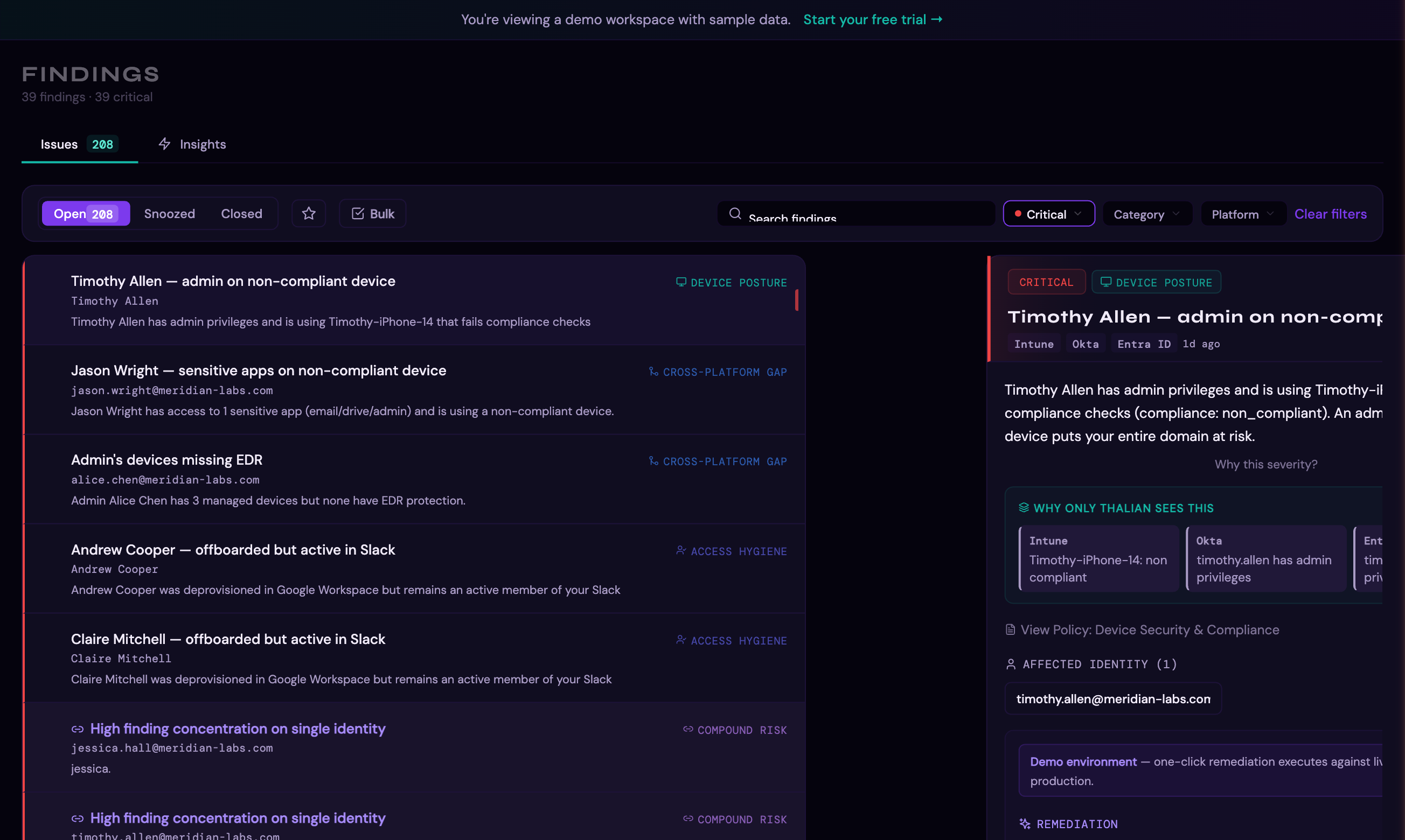
The Findings page (/findings) provides a filterable, searchable list of all findings:
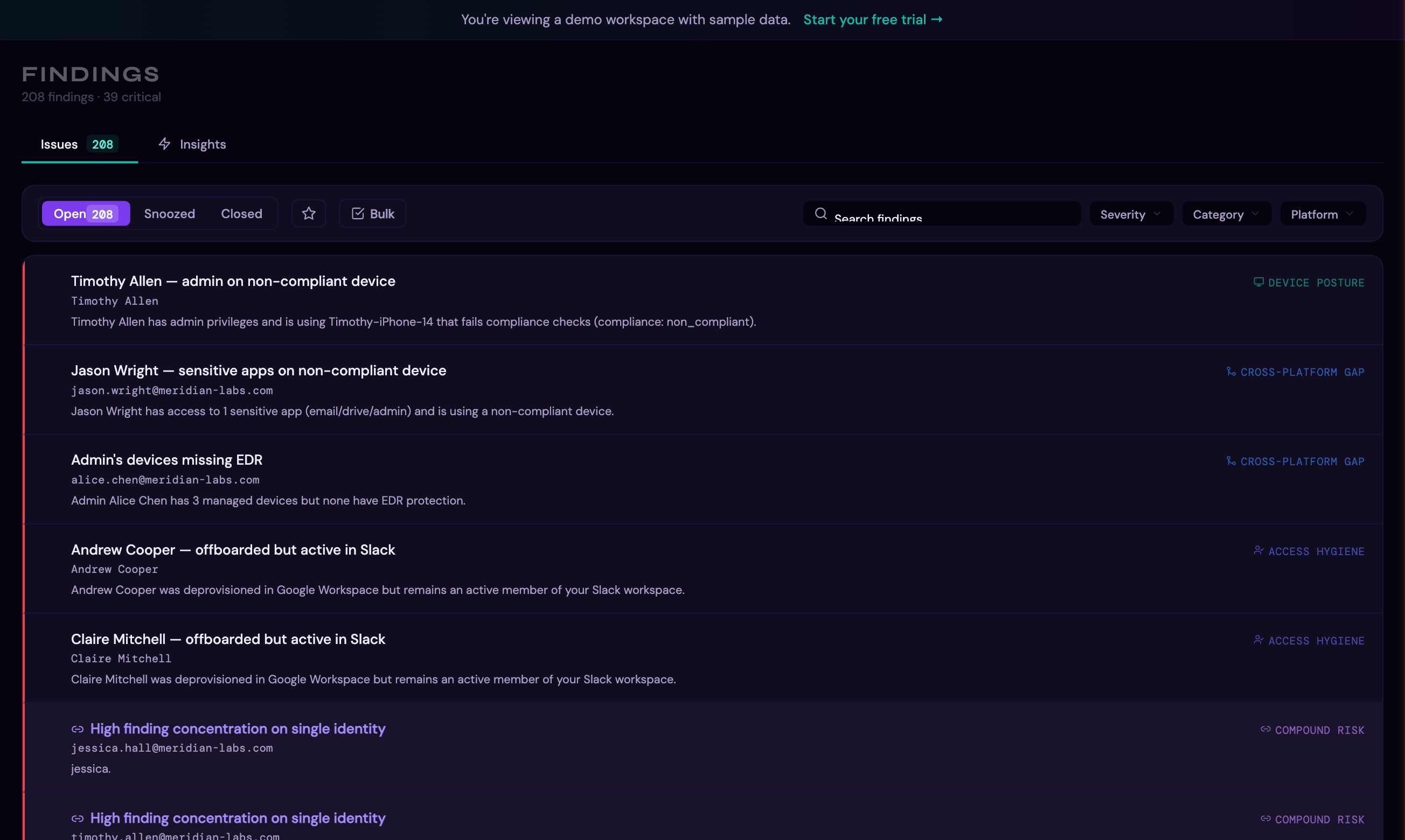
Filtering by Severity
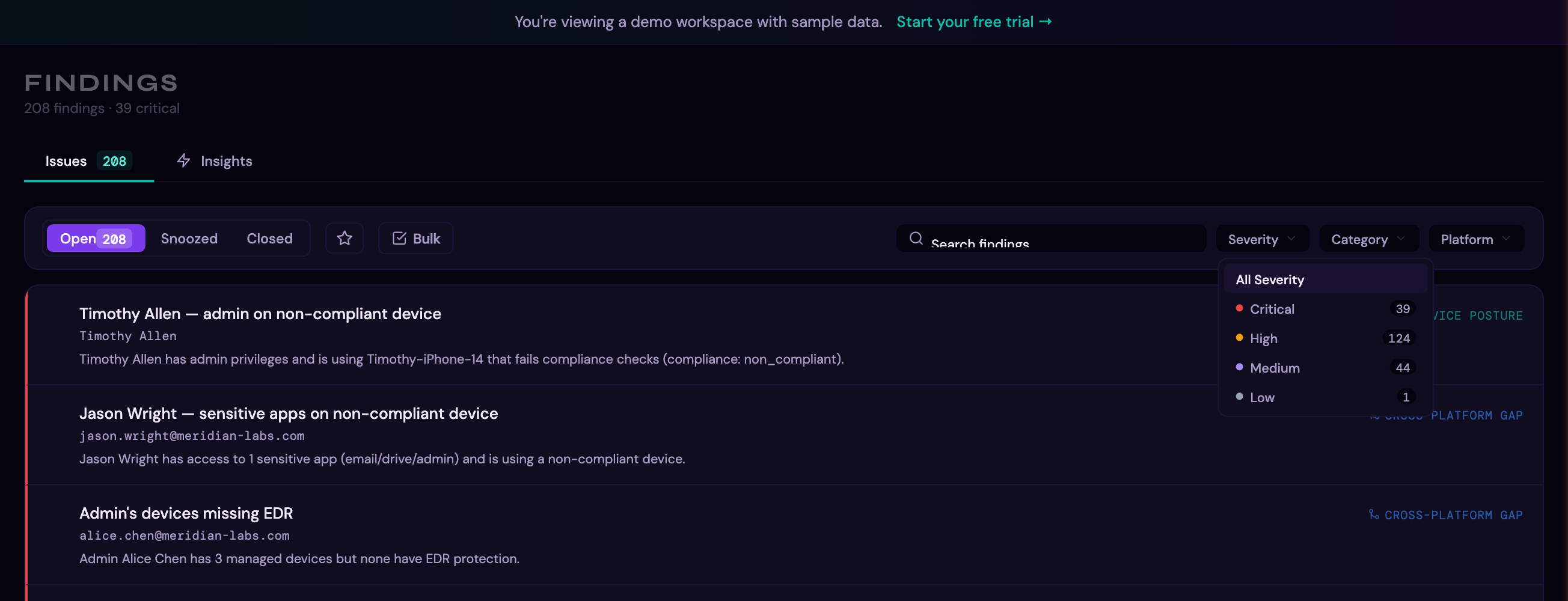
Use the Severity dropdown to narrow findings to a specific risk level. Click the dropdown to see counts for each severity:
Select a severity to filter the list. Here, filtering to Critical shows only the most urgent findings:
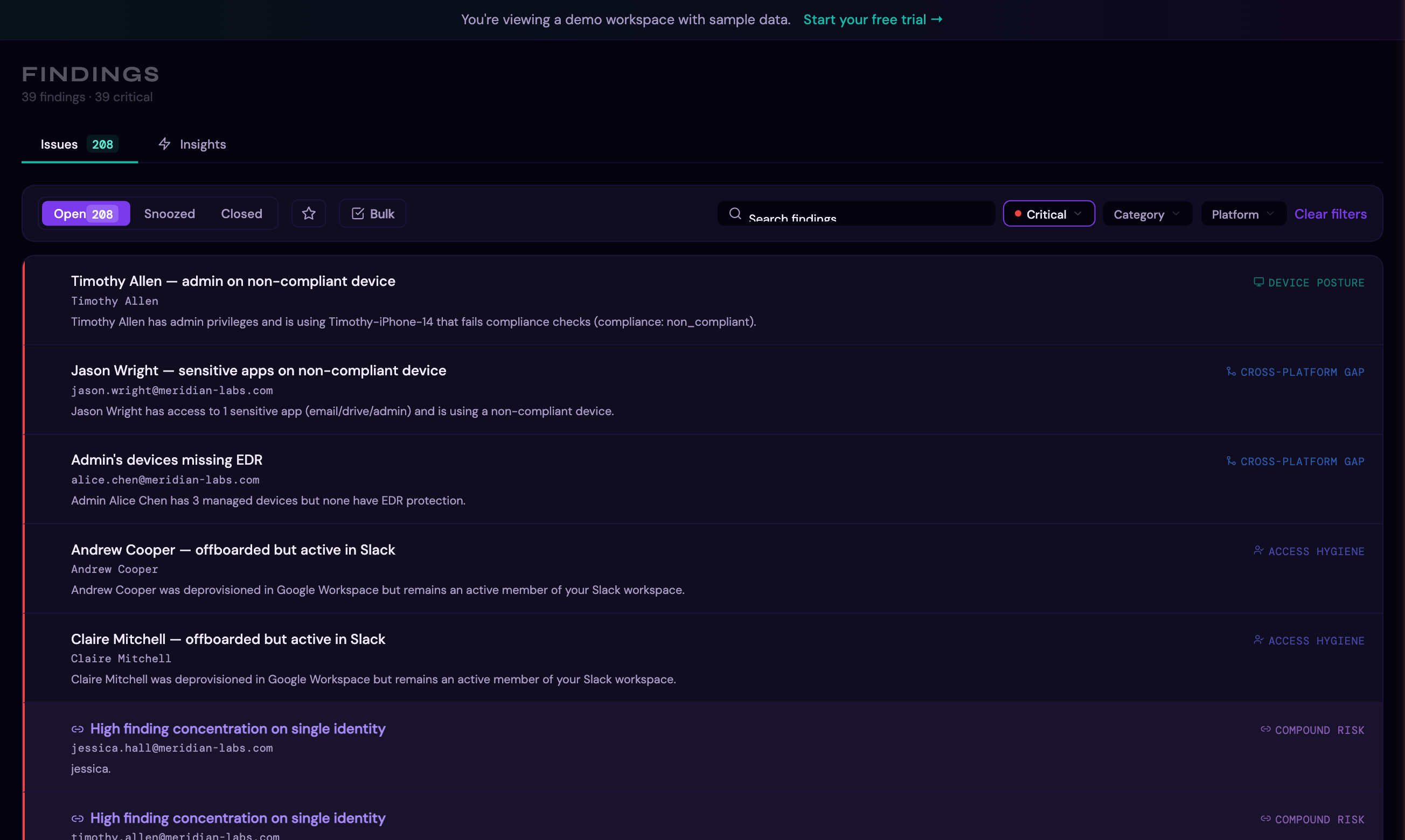
Filters
- Status tab: Open, Resolved, Dismissed
- Severity: Critical, High, Medium, Low
- Category: Identity Security, Access Hygiene, Shadow IT, Device Posture, License Waste, Compound Risk, Drift Signal, Behavioral Anomaly, Access Risk
- Entity type: Identity, Application, Device, Signal
- Platform: Filter by source platform
- Search: Free-text search across finding titles and affected entities
Finding Detail Panel
Click any finding to expand its detail panel, which shows:
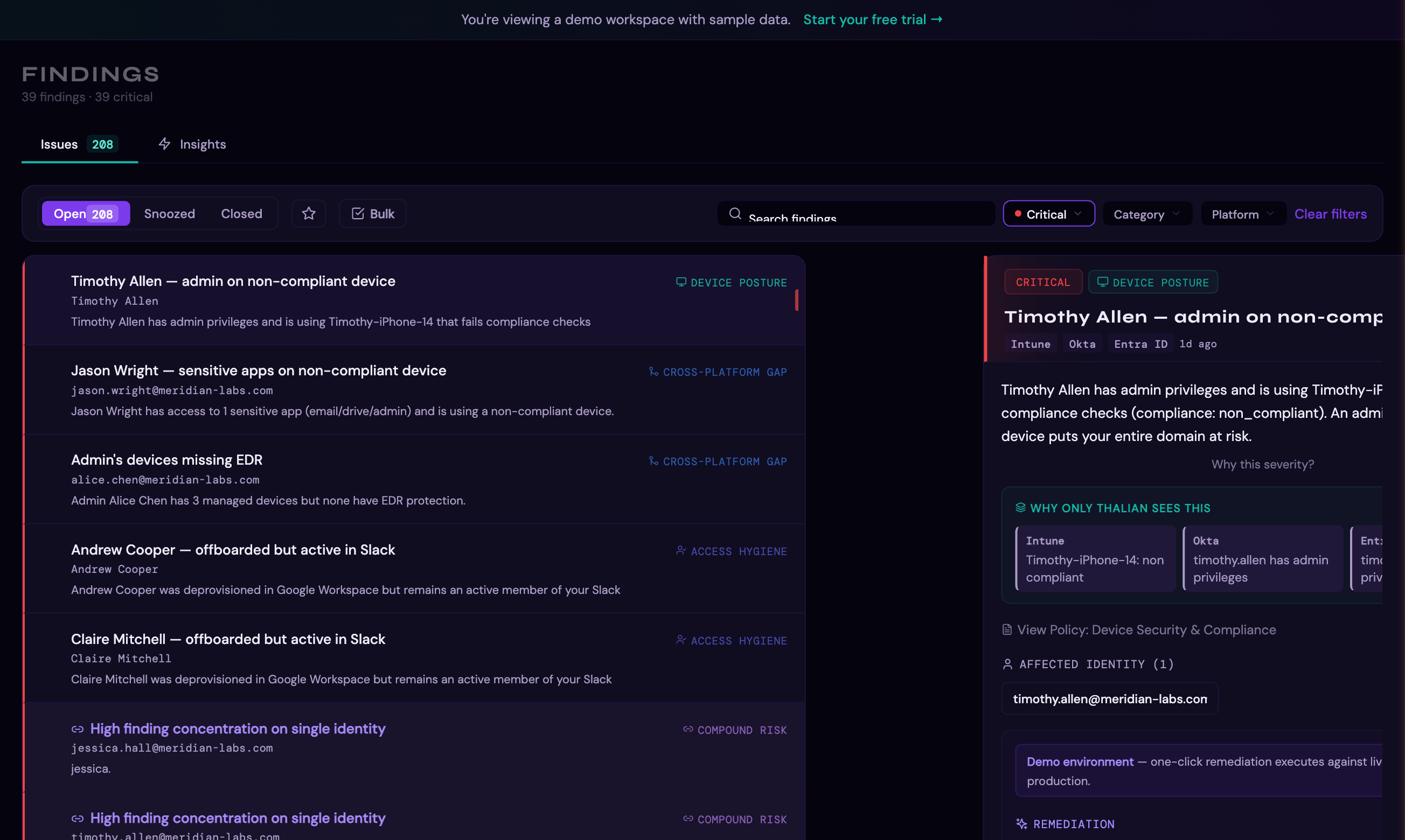
- Full finding description (the sentence-based insight)
- Affected entities with details
- Source platform(s) and the cross-platform perspective view — showing what each connected platform sees independently vs. what Thalian sees by combining them
- Available remediation actions
- Causality insights (related findings across platforms)
- What-if simulation preview (impact of acting on this finding)
- Linked policy (if a matching policy template exists)
Remediation
Available Actions
Thalian supports 40+ remediation action templates across several categories:
Identity actions: | Action | Description | |---|---| | Suspend user | Temporarily disable account access | | Unsuspend user | Restore account access | | Force password change | Require new password on next login | | Force MFA enrollment | Require MFA setup on next login | | Enable MFA (org-wide) | Enforce MFA across the organization | | Revoke OAuth token | Invalidate a specific OAuth grant | | Revoke all tokens | Invalidate all active tokens | | Revoke sessions | End all active sessions | | Deactivate user | Permanently deactivate account | | Offboard user | Composite: suspend + revoke sessions + revoke tokens | | Remove admin role | Demote admin without suspending | | Revoke license | Reclaim license assignment | | Remove from group | Remove user from a specific group | | Rotate credentials | Force credential rotation | | Deprovision user | Remove user from platform entirely | | Reconcile identities | Align identity records across platforms |
Application actions: | Action | Description | |---|---| | Sanction app | Mark as approved/vetted | | Block app | Block application access | | Flag as unauthorized | Mark as shadow IT | | Revoke shadow IT | Remove OAuth grants for shadow apps | | Review app adoption | Investigate low-usage applications | | Consolidate apps | Merge duplicate functional applications | | Flag for renewal | Mark application contract for renewal review |
Device actions: | Action | Description | |---|---| | Sync device | Trigger MDM policy sync | | Remote lock | Lock device remotely | | Retire device | Wipe and remove from management | | Enroll device | Send MDM enrollment invite | | Contain host | Isolate from network (CrowdStrike/SentinelOne) | | Lift containment | Remove network isolation |
Investigation & review actions: | Action | Description | |---|---| | Review SSO coverage | Investigate direct-auth apps bypassing SSO | | Investigate behavioral anomaly | Review unusual access patterns | | Investigate risky sign-in | Review flagged authentication events | | Investigate departing user | Review access for departing employees | | Investigate external sharing | Review external sharing activity | | Review access | General access review for over-provisioned users | | Revoke collaboration access | Remove external sharing or collaboration privileges |
Other: | Action | Description | |---|---| | Create ticket | Create an ITSM ticket for the finding | | Email vendor | Compose email to SaaS vendor (renewal, cancellation, etc.) |
Approval Workflow
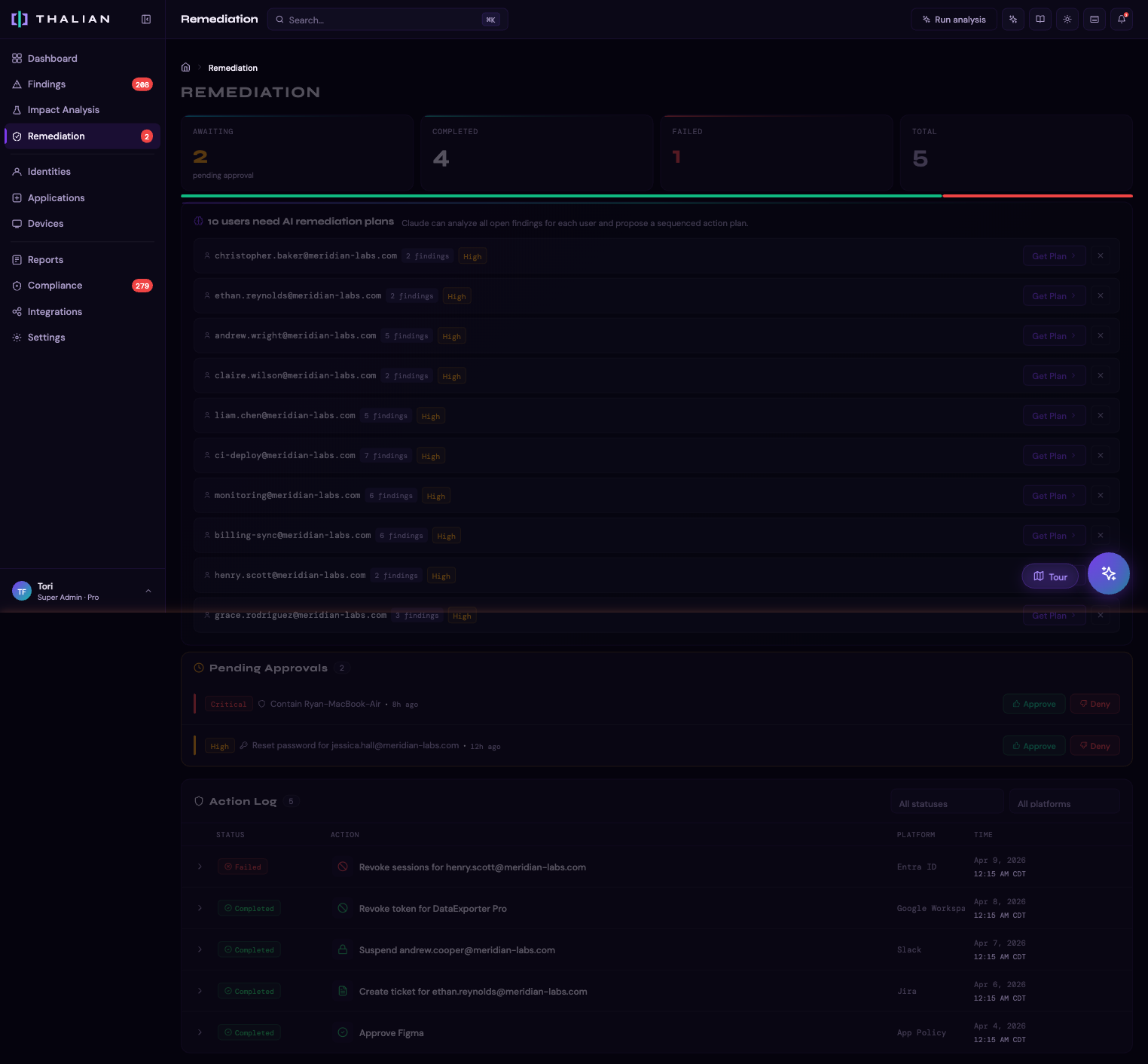
Not all actions execute immediately. The approval workflow depends on role and action severity:
- Agent initiates a remediation action
- If the finding is high or critical severity, the action enters a pending approval queue
- A Security Analyst, Admin, or Super Admin reviews and approves (or rejects) the action
- On approval, the action is executed against the target platform's API
Security Analysts and above can both initiate and approve actions without requiring a second approver.
Agentic Execution
For Pro and Enterprise workspaces, Thalian supports automated remediation with three tiers:
| Tier | Behavior | Actions |
|---|---|---|
| auto_execute | Executes immediately without human review | Create ticket, notify user, sync device, sanction app |
| auto_queue | Queued for approval before execution | Suspend user, block app, revoke OAuth token |
| never | Always requires manual initiation | Retire device, deactivate user, remote lock |
Agentic policies are configurable in Settings > General.
What-If Simulation
Before taking action, you can preview the impact:
- On any finding's detail panel, look for the "What if you act on this?" section
- The simulation shows: findings that would close, findings that might open, and the projected risk score change
- This helps you prioritize actions by their actual impact on your security posture
AI Assistant
The AI assistant (chat panel in the top navigation) provides a natural-language interface for querying findings and initiating remediation actions.
Grouped findings
For findings that affect multiple users — admin without MFA, suspended users in privileged groups, stale admins, and other grouped signals — the assistant surfaces all affected user emails and can act on each one individually. Ask "Who's affected by the admin MFA finding?" and it returns each email by name; follow up with a remediation request and it initiates the action for that specific user.
Chat actions
High-impact actions through the assistant are confirmation-gated — the assistant states the specific action and target before executing.
| Action | Description |
|---|---|
| Remove admin role | Removes admin or privileged roles from a user across all connected IDPs (Okta, Google Workspace, Entra ID, JumpCloud, OneLogin). Account stays active; only elevated roles are removed. |
| Suspend user | Temporarily disable account access |
| Revoke sessions | End all active sessions |
| Dismiss finding | Dismiss a finding with a reason |
| Snooze finding | Snooze a finding for 1–90 days |
All actions taken through the AI assistant are recorded in the audit log.
Causality Insights
When Thalian detects that findings are related across platforms, it surfaces Causality Insights — connections between findings that share the same affected entity. For example:
- A user flagged for "dormant Okta account" might also appear in "active Google Workspace admin" — revealing a cross-platform access gap
- An application flagged as shadow IT in one finding might also appear in a license waste finding
Click the linked finding chips to navigate between related findings.
For information on tracking remediation actions over time, see Reports & Audit.